💳 How to Donate via Bank Transfer
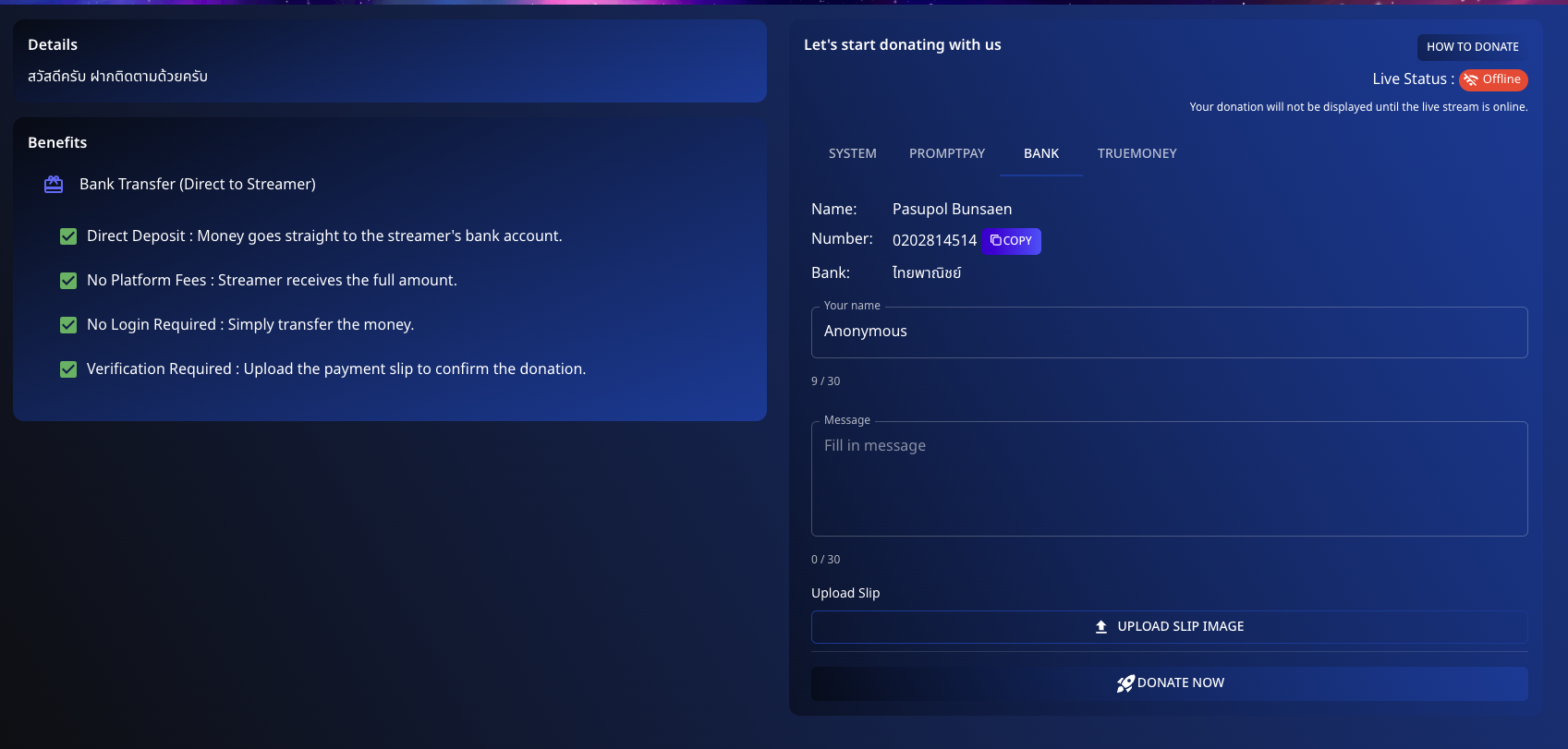
Directly support your favorite streamers using Bank Transfer on Spectrum Live. Follow these steps to make a donation:
📌 Step 1: Prepare Your Transfer
-
Navigate to the Bank Transfer option in the donation section.
-
Find the bank details provided:
- Name: [Streamer Name]
- Account Number: [Account Number]
- Bank: [Bank Name]
-
Enter your details:
- Name: Optionally enter your name or remain anonymous.
- Message: Include a personalized message if desired.
📌 Step 2: Transfer the Amount
- Use your banking app or service to transfer the donation amount to the provided account details.
- Complete the transfer ensuring all details are accurate.
📌 Step 3: Upload Payment Confirmation
- Upload the payment slip or transfer confirmation to verify your donation.
- Click "Donate Now" to complete the process.
💡 Benefits of Using Bank Transfer
- Direct Deposit: Money goes straight to the streamer's bank account.
- No Platform Fees: Streamer receives the full amount.
- No Login Required: Simply transfer the money.
- Verification: Upload the payment slip to confirm the donation.
Make a difference with a secure and direct bank transfer to your favorite streamers!
Feel free to modify the draft with specific details for your platform.