🖥️ Display Undisplayed Donation
Streamers on Spectrum Live can easily manage and display donation messages using the dashboard. Here's how:
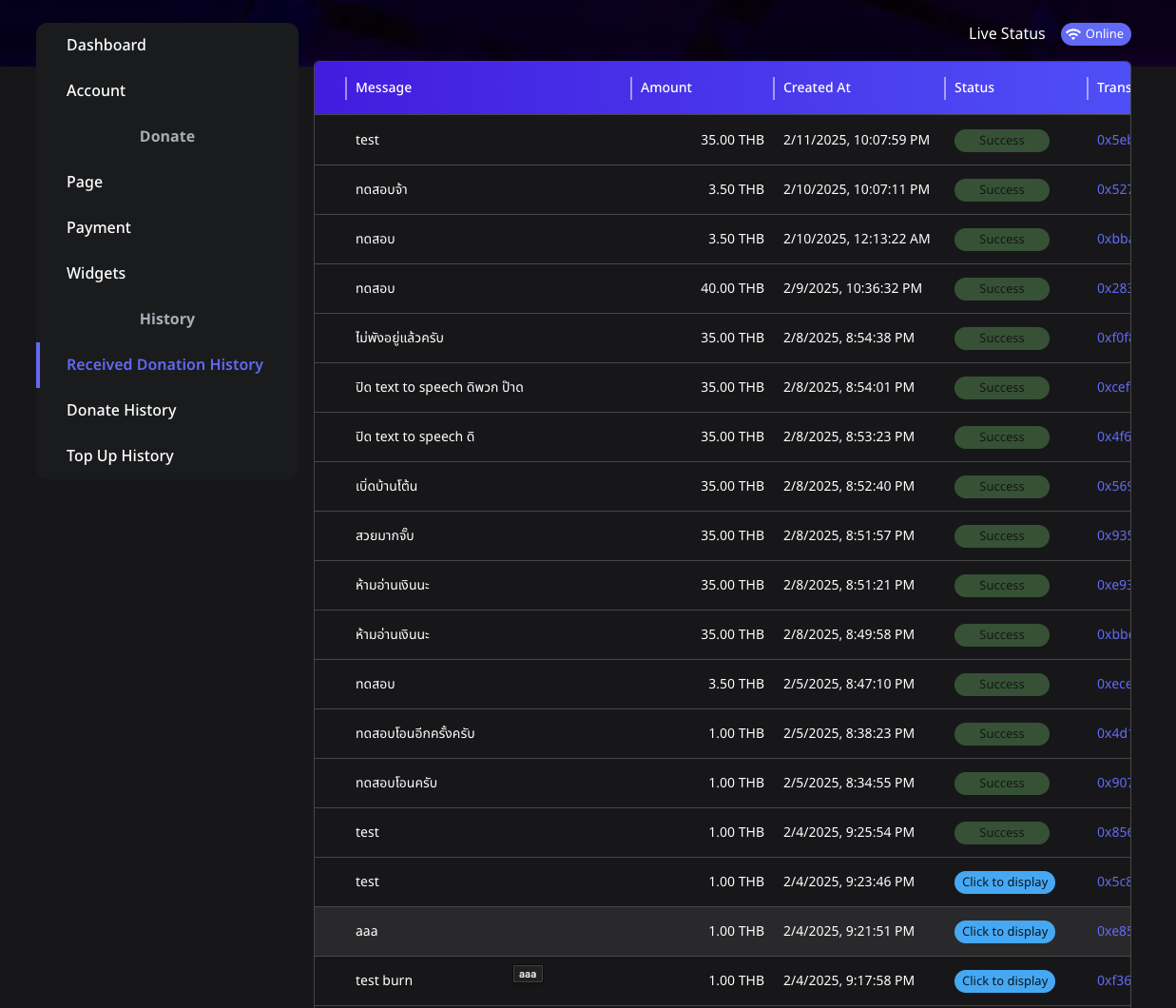
📌 Step 1: Access Your Dashboard
- Log in to your Spectrum Live account.
- Navigate to the Dashboard on the top left menu.
📌 Step 2: Check Your Donation History
- Click the Received Donation History on the sidebar.
- View all donation transactions, including:
- Donator: The name of the donor.
- Message: Content from the donor.
- Amount: The donation value.
- Created At: Date and time of the donation.
- Status: Success or pending.
- Transaction: Clickable link for transaction details.
📌 Step 3: Display Undisplayed Donation Messages
- Ensure your live stream is Online.
- Locate entries with the "Click to display" button.
- Click "Click to display" to manually trigger the display of any pending donation messages.
💡 Tips for Streamers
- Ensure your stream is Online before displaying messages to avoid interruptions.
- Regularly check the donation history to manage undisplayed messages efficiently.
Keep your audience engaged and acknowledge their support by promptly managing and displaying donation messages!
Let me know if there's anything else you'd like to include!